The market data integration with Bloomberg requires that Bloomberg activate their dlws (data licens webservice).
The integration with Bloomberg also requires a valid certificate. The certificate is created by the customer via OpenSSL (v3) with assistance from Bloomberg.
The certificate should be of type .p12, and should have an associated password. If the certificate comes as .pfx, just change the name to .p12 and the upload will work. Bloomberg can assist with instructions of how to convert to the correct file format before upload in Your TS.
The certificate is uploaded to the 'Credentials' menu in Treasury Systems where the password also is entered.
The public part of the certificate needs to be uploaded to Bloomberg.
Historical market data
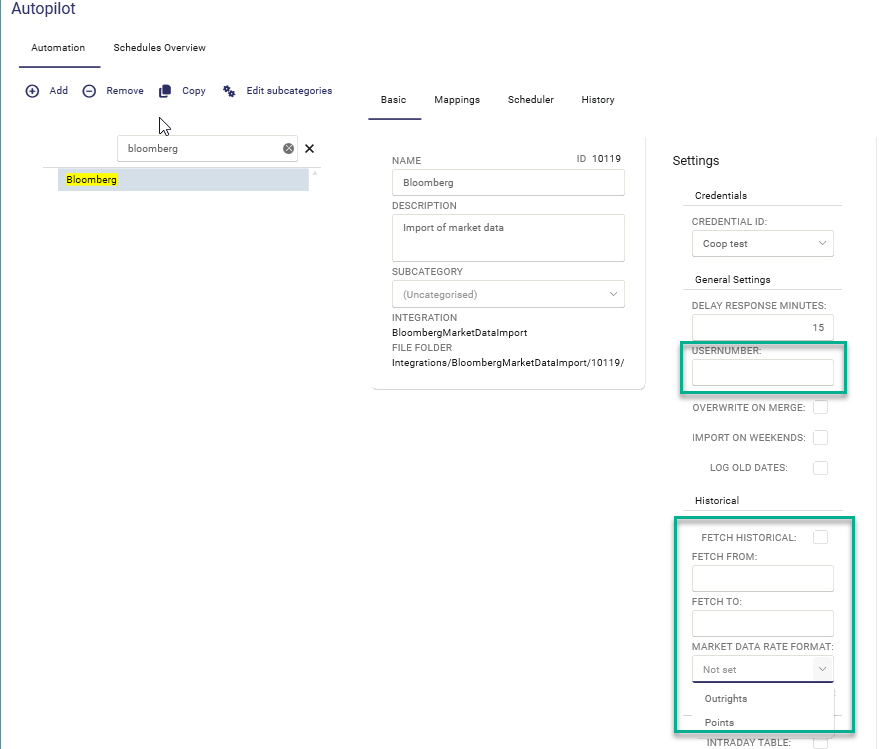
If you would like to fetch historical market data you must select Market Data Rate Format, either Outrights or Points. For the default fetch the only option available is Outrights.
For terminal fetch (If Usernumber entered) both Outrights and Points are available. But it is important that the setting in TS is aligned with the setting selected in Bloomberg for the specific user.
Market data type

Each tab in the integration are adding the below Market Sector codes to the Supplier Code in the request to Bloomberg, ie the below Market Sector codes should not be included in the mapping in TS:
Ts Market Data Type = Bloomberg Market Sector Code
FX = Curncy
Tab Market Data
Ois = Index
Fra = Index
(CCIrs = Index , Not in use)
Tab Commodity
Tab Energy
Power = Comdty
Tab Bonds
Bonds of type Bond Futures = Comdty
FX option = Curncy
Tab Fund
Was this article helpful?
That’s Great!
Thank you for your feedback
Sorry! We couldn't be helpful
Thank you for your feedback
Feedback sent
We appreciate your effort and will try to fix the article