Front Office > New Deal
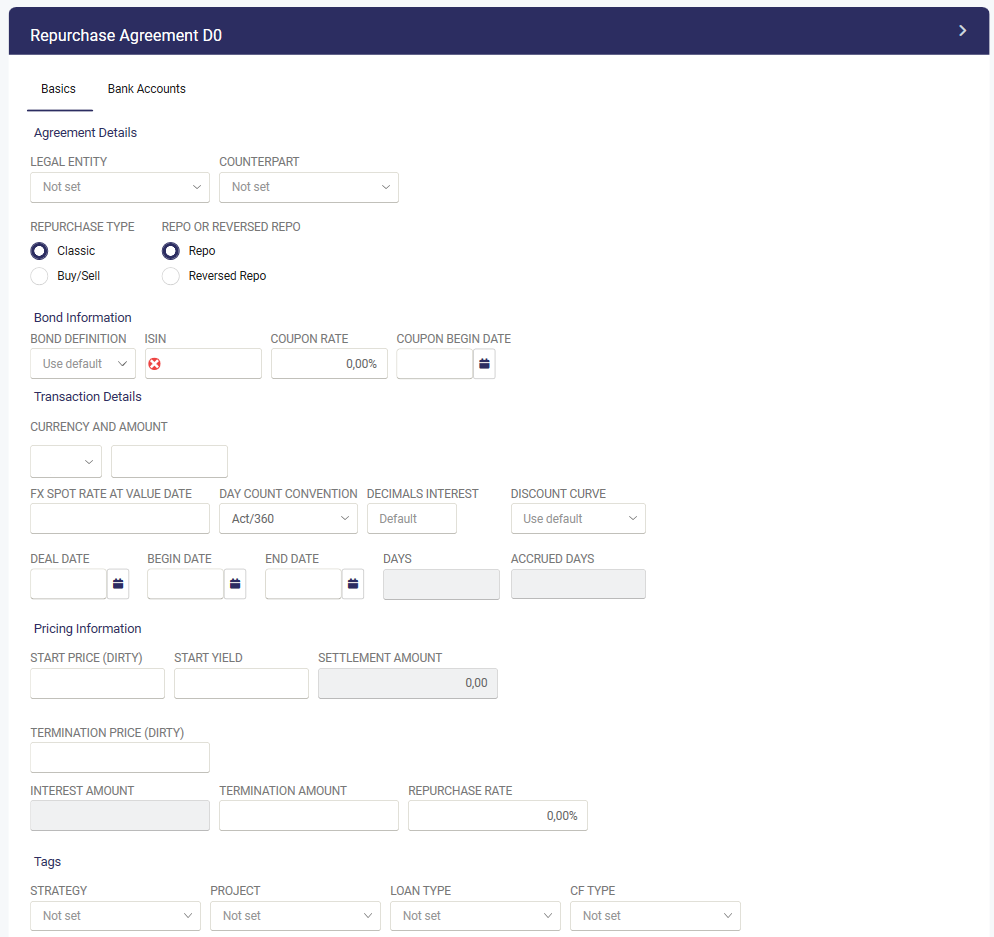
- Choose New deal - Repurchase

- Select Legal entity and Counterpart
- Select Type ( Classic or Buy/Sell). Only for information.
- Select if it is a Repo or a reversed Repo
- If the repo is connected to a Bond in your possession, select the relevant bond in the Bond definition. Some fields will then be prefilled. If the bond is not in your possession please fill in ISIN.
- Fill in Currency and Amount
- FX Spot rate at value date is typically used when register a historical repo where you do not have a fx rate table in the system.
- Enter the applicable Day count convention
- Fill in the Deal, Begin and End date of the repo. The system will calculate the days for the repo
- Fill in the Start price (dirty)
- Enter one of Termination price (dirty), Termination amount or Repurchase rate. Once one of the fields are filled in the rest will autofill.
- Add relevant tags and have a look at the bank accounts so that they are correct and the press Save.
Was this article helpful?
That’s Great!
Thank you for your feedback
Sorry! We couldn't be helpful
Thank you for your feedback
Feedback sent
We appreciate your effort and will try to fix the article