TS calculates VaR using historical scenario, full revaluation approach. It Is possible to get a total value, portfolio value and also see each deals contribution for the VaR to analyze the details and to find easily abnormalities or missing market data.
This article will give you an overview of the process of Value at Risk (VaR) analysis by historical values
System Setting Activate "Should create Value at Risk Scenarios" Select consolidation currency (Key Currency)
Risk Portfolio Rules - are used to categorise different deals into various risk portfolios. It is needed if the VaR should be calculated at the risk portfolio level.
Autopilot
There is an activity in the Autopilot to calculate the VaR Scenarios. This is scheduled to run after market date is imported and off business hours.
Only update error scenarios - If you need to run an update due to missing market data during the day
Valuation date - Today
Scenario Min Date- (default and also maximum -252 weekdays)
Scenario Max Date- (default valuation date but can be earlier)
Normal selection is also available.
VaR Scenarios
A view to look at the market values and profit/loss effect for Scenario dates, portfolios, deal types and per deals.
Can be used to dig deeper into the Value at risk numbers presented in the report. Please see more via the following link
Z-spread calculation - A Z-spread is calculated for Bonds and Commercial Paper as a fixed spread based on the difference between the Bond price and the Yield curve and is used in the VaR calculation to get a more correct profit and loss value, including the counterparty risk.
Report Columns
To see the VaR and analyse per portfolio and deal, there are new report columns to be added in a profit and loss report:
Value at Risk (Deal Part) The value at risk for the specific deal part
Value at Risk Contribution The contribution to Value at Risk for the specific deal part
Value at Risk (Portfolio) Aggregation type needs to be distinct
Value at Risk Contribution (Portfolio) The contribution to the Value at risk from the deal part within the portfolio.
Value at Risk (Total) Calculated value at risk for the entire selection, Note Aggregation type needs to be distinct.
Value at Risk Scenario date for (Deal Part), (Portfolio) and (Total)
Shows the date from which the VAR value is taken
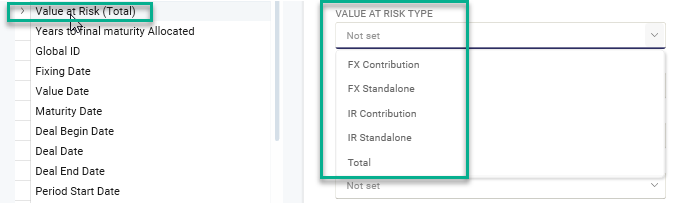
All the columns above have the 'Value at Risk Type' setting (see print screen below) , to be able to split the VAR into an FX effect and IR effect,
with following options:
Total, FX Standalone, FX Contribution, IR Standalone and IR Contribution. Total is default if no selection is done.
FX Standalone - Worst case FX VAR
FX Contribution - Part of the VAR that consists of FX effect.
IR Standalone - Worst case IR VAR
IR Contribution - Part of the VAR that consists of IR effect.
Value at Risk Type setting
Possibility to set
Probability level between 0-100 default is 95 and
Horizon use datecode specifying the time frame of the potential loss deafult 1d.
TS does not calculate VaR for Forecast transactions, Bank account transaction, Fees or Credit facility