To use the TS Report and Market Data API, register an application in your organization's Microsoft Entra ID. You then use the application's client ID, tenant ID and secret to authenticate with the API.
Your IT department sets this up.
Steps
Register the application
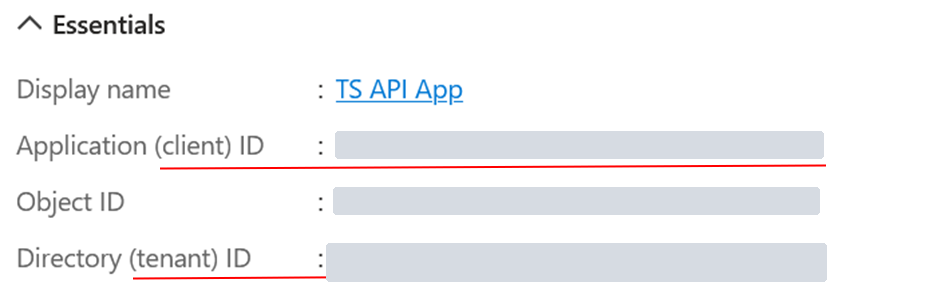
Register a new application in Microsoft Entra ID. Give it a name, for example "TS API App", and under Supported account types choose Accounts in this organizational directory only.

Go to the application's Overview and note down the Application (client) ID and the Directory (tenant) ID.
Create a client secret
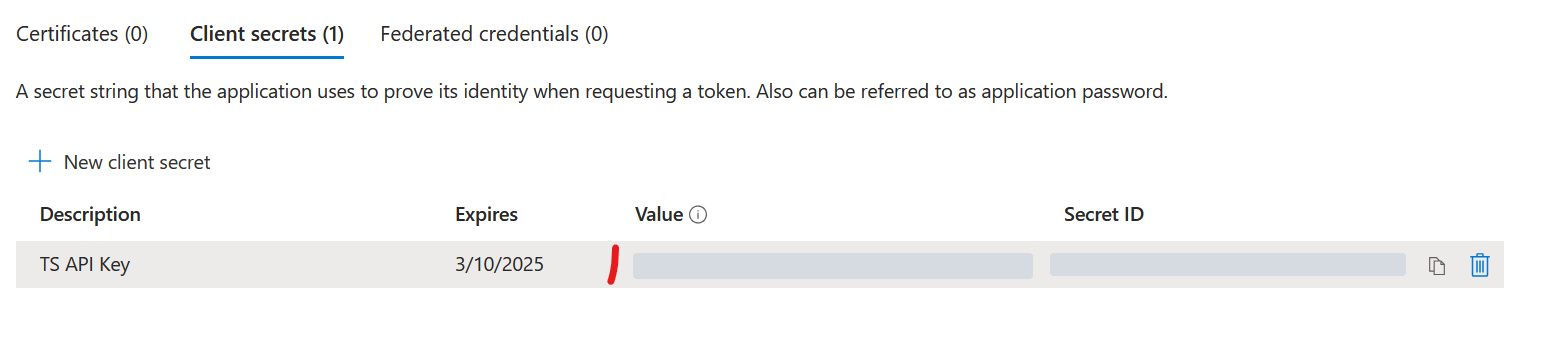
Go to Certificates & secrets › Client secrets and select New client secret.

Choose a name and an expiry date, then copy the secret's Value.
Test the application
- Test access with the client ID, tenant ID and secret, using the examples in Use Tools, Scripting or Integration Platforms to access TS Report and Market Data API.
If you get error AADSTS501051
When you acquire a token, you may get this error:
AADSTS501051: Application <application name> isn't assigned to a role for the <web API>This happens if access to Treasury Systems SaaS is limited under Enterprise applications in Entra ID, with Assignment required? set to Yes.
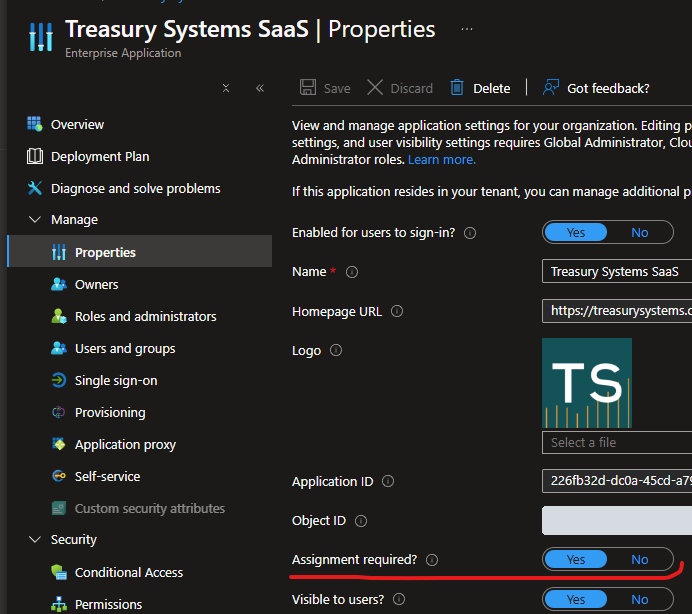
To fix it, do one of these:
- Turn off Assignment required? for Treasury Systems SaaS.
- Grant the registered application access to Treasury Systems SaaS. At the time of writing, this can't be done in the Entra ID interface and needs a script. Microsoft's instructions are in Assign users and groups to an application.
This PowerShell script grants the access. Replace [YOUR APP DISPLAYNAME] with your application's name, for example 'TS API App'.
# Get the 'Treasury Systems SaaS' application
$tsSaas = Get-AzADServicePrincipal -Filter "displayName eq 'Treasury Systems SaaS'"

# Get the service principal to grant access to
$myApiClient = Get-AzADServicePrincipal -Filter "displayName eq '[YOUR APP DISPLAYNAME]'"
# Show client info
$myApiClient | ft AppDisplayName, Id, AppId

echo "Granting Application '$($myApiClient.AppDisplayName)' access to '$($tsSaas.AppDisplayName)'"
New-AzADServicePrincipalAppRoleAssignment -ResourceId $tsSaas.Id -ServicePrincipalId $myApiClient.Id -AppRoleId 00000000-0000-0000-0000-000000000000
Related articles
- Use Tools, Scripting or Integration Platforms to access TS Report and Market Data API
- Overview of Using the TS Report and Market Data API
- Use Excel or Power BI to access TS Report and Market Data API
Further reading
- Microsoft: Manage service principals, which this guide was originally based on