The TS API lets users and data centres fetch data from TS reports and market data:
- Report data: any report in TS, run in real time (
/realtime/), or a daily snapshot of a system report (/atdate/and/daterange/). - Market data: FX and interest rates and more, as they're shown in TS.
Get started
There are two ways to authenticate:
- As yourself, with your Entra ID or TS user. Use this to connect Excel or Power BI; see Use Excel or Power BI to access TS Report and Market data API.
- With JWT bearer tokens. Use this with integration platforms (Logic Apps and others) or tools and scripts (Python, PowerShell, cURL, Postman and others); see Use Tools, Scripting or Integration Platforms to access TS Report and Market Data API.
Give a user access for Excel or Power BI
- Sign in to TS as a user with permission to edit users.
In Roles & Permissions, give the user who wants to use the API from Excel or Power BI the permission Public API Access.

The API now accepts that user's requests.
Set up token access for tools, scripts and applications
- Set up an application in your identity provider. If your organisation uses Entra ID, see Register an application in Microsoft Entra ID for the TS API.
- Call the API once, so that TS creates an API user; see Use Tools, Scripting or Integration Platforms to access TS Report and Market Data API.
Sign in to TS as a user with permission to edit users, and give the new API user the permission Public API Access.

The API now accepts the application's requests.
Ways to call the API
| Tool | How |
|---|---|
| Excel or Power BI | See Use Excel or Power BI to access TS Report and Market data API. |
| cURL, PowerShell, Logic Apps | See the examples in Use Tools, Scripting or Integration Platforms to access TS Report and Market Data API. |
| Postman | Add an application and create a token; see Register an application in Microsoft Entra ID for the TS API. |
| Python | Download the attached file FetchTSdata.py (below the article) and update the tenant and customer name (domain) in it. |
Versions
Every request names an API version: add /v and the version number to the endpoint's URL. Old versions are kept for six months.
https://ts.treasurysystems.com/tenants/CUSTOMERNAME/api/reportdata/realtime/v3| Release | Version | Added |
|---|---|---|
| 26.5 | v4 | VaR scenarios (/var/) and historical market values (/historicalmarketvalue/) |
| 26.4 | v4 | FX rates against a specific currency, rather than by the currency hierarchy set in Currencies (see FX rates) |
| 25.13 | v3 | Intraday rates in /fx/ and /fxfwd/ |
| 25.9 | v3 | The reports in TS (see Reports (create new and update a report)), as an extension of /realtime/ |
| 25.7 | v3 | Date ranges for FX and interest rate market data; FX market data against a currency; YTD and MTD rates, and bid and ask rates with forward points; the parameter date (called dateCode before) |
| 25.3 | v2 | The /fxfwd/ endpoint, interpolating rates for specific maturity dates |
| 25.1 | v2 | An improved JSON format |
Report data endpoints
The base URL for report data is:
https://ts.treasurysystems.com/tenants/[CUSTOMERNAME]/api/reportdata/The /atdate/ and /daterange/ endpoints return a snapshot taken every day at 21:00 CET, based on a system report you manage in TS; see Save Report Data to the API. You can update the snapshot with the TS Autopilot; see Schedule the saving/updating of API data.
/atdate/
Returns the dataset created on the date you give.
| Parameter | Required | Description |
|---|---|---|
date | Yes | The date to fetch the dataset for, as a date code (see Date codes below) |
https://ts.treasurysystems.com/tenants/CUSTOMERNAME/api/reportdata/atdate/v3?date=20241001/realtime/
Runs the system report in real time and returns its data. If anything changes in TS and you call it again the same day, you may get a different dataset. This endpoint has no parameters.
https://ts.treasurysystems.com/tenants/CUSTOMERNAME/api/reportdata/realtime/v3/realtime/[report ID]/
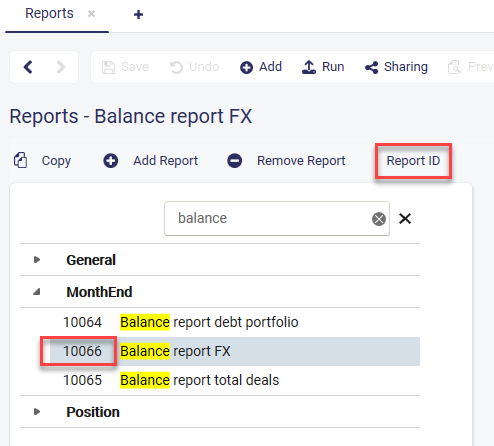
Runs the report with the given ID in real time and returns its current data. If anything changes in TS, the next call may return a different dataset. To find a report's ID, select Report ID in the reports view.
The three parameters are optional. Each one replaces the value saved in the report. They aren't supported for the "Multiple Balance Days" report.
| Parameter | Required | Description |
|---|---|---|
balanceDate | No | The report's balance date |
measuringPeriodStart | No | The start of the report's measuring period |
measuringPeriodEnd | No | The end of the report's measuring period |
https://ts.treasurysystems.com/tenants/CUSTOMERNAME/api/reportdata/realtime/12345/v3?balanceDate=2025-04-01&measuringPeriodStart=2025-04-01&measuringPeriodEnd=2025-06-30
https://ts.treasurysystems.com/tenants/CUSTOMERNAME/api/reportdata/realtime/10066/v3?balanceDate=2025-05-31
https://ts.treasurysystems.com/tenants/CUSTOMERNAME/api/reportdata/realtime/10066/v3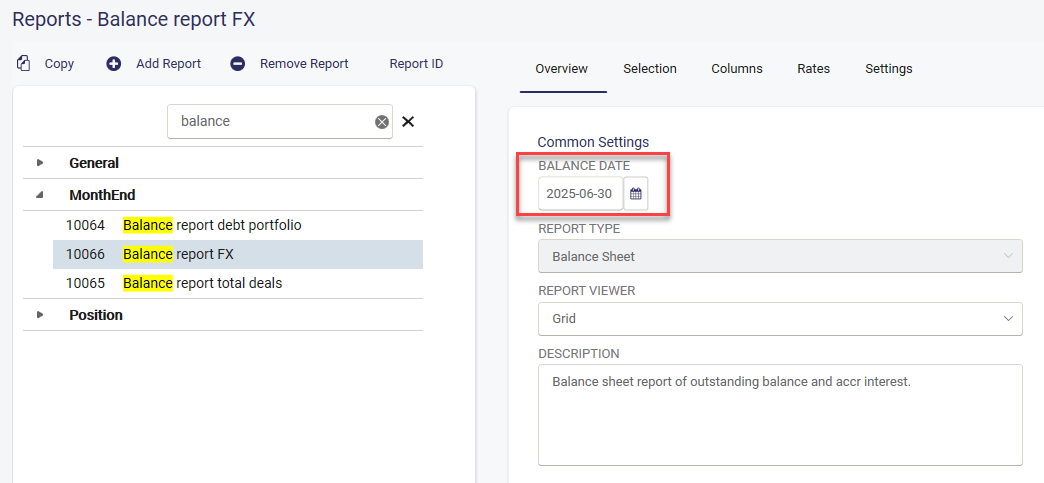
/daterange/
Works like /atdate/, but returns every dataset between two dates, as a JSON collection. For example, fromDate=20240301 and toDate=20240401 return the daily datasets from 1 March to 1 April 2024.
| Parameter | Required | Description |
|---|---|---|
fromDate | Yes | The start of the date range, as a date code |
toDate | Yes | The end of the date range, as a date code |
https://ts.treasurysystems.com/tenants/CUSTOMERNAME/api/reportdata/daterange/v3?fromDate=20241001&toDate=20241010Market data endpoints
The base URL for market data is:
https://ts.treasurysystems.com/tenants/[CUSTOMERNAME]/api/marketdata//fx/
Returns FX rates for a date, as a JSON object: the time the rate is valid, the base currency, the price currency, the mid, bid and ask rates, and the periods the rates are valid for. YTD and MTD rates are included for the SPOT period.
| Parameter | Required | Description |
|---|---|---|
date | Yes | A date code. Set it to intradayrate to get intraday rates. |
priceCurrency (v4), currency (v3) | Yes | The currency to get rates against; see FX rates. v3 returns rates in the default market convention. v4 returns the price currencies, unless defaultConvention is true. |
periods | No | One or more periods, separated by semicolons (SPOT;3M;6M). The default is SPOT. Available: ALL, SPOT, 1W, 2W, 3W, 1M to 11M, 1Y, 2Y, 3Y. ALL returns every period. |
defaultConvention (v4) | No | True returns default market convention rates. False, or left out, returns price currencies. |
# v4
https://ts.treasurysystems.com/tenants/CUSTOMERNAME/api/marketdata/fx/v4?date=260120&priceCurrency=USD&periods=ALL&defaultConvention=true
https://ts.treasurysystems.com/tenants/CUSTOMERNAME/api/marketdata/fx/v4?date=260120&priceCurrency=SEK
# v3
https://ts.treasurysystems.com/tenants/CUSTOMERNAME/api/marketdata/fx/v3?date=20240312¤cy=SEK
https://ts.treasurysystems.com/tenants/CUSTOMERNAME/api/marketdata/fx/v3?date=intradayrate¤cy=SEK
https://ts.treasurysystems.com/tenants/CUSTOMERNAME/api/marketdata/fx/v3?date=20240312¤cy=USD&periods=SPOT;3M;6M/fx/daterange/
Returns FX rates for a range of dates, with the same content for each day as /fx/. The parameters are the same as for /fx/, with a from and to date in place of the date.
| Parameter | Required | Description |
|---|---|---|
fromDate | Yes | The start of the date range, as a date code |
toDate | Yes | The end of the date range, as a date code |
priceCurrency (v4), currency (v3) | Yes | The currency to get rates against; see FX rates |
periods | No | One or more periods, as for /fx/ |
defaultConvention (v4) | No | True returns default market convention rates |
# v4
https://ts.treasurysystems.com/tenants/CUSTOMERNAME/api/marketdata/fx/daterange/v4?fromDate=260217&toDate=260220&priceCurrency=SEK
https://ts.treasurysystems.com/tenants/CUSTOMERNAME/api/marketdata/fx/daterange/v4?fromDate=251215&toDate=260401&priceCurrency=SEK&defaultConvention=true
# v3
https://ts.treasurysystems.com/tenants/CUSTOMERNAME/api/marketdata/fx/daterange/v3?fromDate=20240312&toDate=20240316¤cy=USD&periods=SPOT;3M/ir/
Returns interest rates for a date, as a JSON collection.
| Parameter | Required | Description |
|---|---|---|
date | Yes | A date code, as for /fx/ |
https://ts.treasurysystems.com/tenants/CUSTOMERNAME/api/marketdata/ir/v3?date=20240312/ir/daterange/
Returns interest rates for a range of dates, with the same content for each day as /ir/.
| Parameter | Required | Description |
|---|---|---|
fromDate | Yes | The start of the date range, as a date code |
toDate | Yes | The end of the date range, as a date code |
https://ts.treasurysystems.com/tenants/CUSTOMERNAME/api/marketdata/ir/daterange/v3?fromDate=20240312&toDate=20240316/fxfwd/
Contact sales if you want to use this endpoint.
Returns an FX forward rate for a date. For a broken date, it returns the rate interpolated for a maturity date between the start and end of the tenor period. The rate depends on the deal date, the maturity date, the currency pair, and whether you ask for buy (ask) or sell (bid) rates.
| Parameter | Required | Description |
|---|---|---|
buyOrSell | Yes | Buy or Sell: which rates are returned |
currencyPair | Yes | A/B gives the number of units of currency B per unit of currency A; B/A gives the opposite |
maturityDate | Yes | The date code the rate is interpolated up to |
dealDate | Yes | The date code the rate is interpolated at |
rateDate | No | The date code of the rate table to use; intradayrate uses intraday rates (see Intraday FX rates) |
https://ts.treasurysystems.com/tenants/CUSTOMERNAME/api/marketdata/fxfwd/v3?buyOrSell=Sell¤cyPair=EUR/SEK&maturityDate=20250311&dealDate=20250307
https://ts.treasurysystems.com/tenants/CUSTOMERNAME/api/marketdata/fxfwd/v3?buyOrSell=Sell¤cyPair=EUR/SEK&maturityDate=20250311&dealDate=20250307&rateDate=intradayrate
/var/
Returns the market value in the consolidated currency; see Value at Risk.
| Parameter | Required | Description |
|---|---|---|
fromDate | Yes | The start of the market value period |
toDate | Yes | The end of the market value period |
https://ts.treasurysystems.com/tenants/CUSTOMERNAME/api/marketdata/var/v4?fromDate=260217&toDate=260220/historicalmarketvalue/
Returns the market value in the consolidated currency; see Historical Market Values.
| Parameter | Required | Description |
|---|---|---|
fromDate | Yes | The start of the market value period |
toDate | Yes | The end of the market value period |
https://ts.treasurysystems.com/tenants/CUSTOMERNAME/api/marketdata/historicalmarketvalue/v4?fromDate=260217&toDate=260220Errors and limits
Errors
Any unexpected error returns status code 500. If errors occur, contact TS support.
Rate limit
The standard limit is 100 requests a day. Contact sales if you need more.
Response codes
| Code | Meaning |
|---|---|
| 200 OK | The request succeeded |
| 204 No Content | There are no datasets to return for the endpoint |
| 400 Bad Request | Invalid request: the endpoint doesn't follow the expected pattern |
| 401 Unauthorized | Authentication failed |
| 403 Forbidden | The API user is missing the permission Public API Access |
| 404 Not Found | The resource wasn't found |
| 405 | The parameters weren't entered correctly |
| 500 Internal Server Error | Something went wrong on the server |
Date codes
Write dates as a date, such as 20240101, or as a code such as TODAY, which is the date the request is sent.
| Code | Means |
|---|---|
TODAY | The current date |
D | The next day |
BD | The next business day |
W | A week from now |
M | A month from now |
Q | A quarter from now |
Y | A year from now |
Monday to Sunday | The next such weekday after today |
Combine an operator (+ or -), a number and a code:
-5W: 35 days before today-7BD: 7 business days before today, taking holidays into account-1Monday: the Monday before today