Notification Center
The Notification Center allows you to configure how users and systems are notified when specific events occur in Treasury Systems (TS). It provides flexible options to send email alerts, trigger activities, or call webhooks (for example Slack, Microsoft Teams, or other external systems).
All events recorded in the TS Event Log can be used as triggers. For each relevant event, you can decide whether it should generate:
- an email alert,
- an automated activity,
- or a webhook notification to an external system.
Supported Events
The first release of the Notification Center supports alerts and notifications for, but is not limited to, the following events:
- New deals requiring confirmation (including Deal ID and Trader)
- Payments awaiting approval or export
- User logins to Treasury Systems
- Modified deals
- Manually updated interest
- Changes to user or role permissions
Permissions
To work with the Notification Center, the following permissions are required:
- Read Event Subscriptions – View existing subscriptions and configurations
- Update Event Subscriptions – Create, modify, or delete subscriptions
Settings / Setup
Step 1: Create an Event Subscription
- Click the “+” icon to create a new subscription.
- Enter a subscription name that clearly describes its purpose.
Step 2: Define Event Filters
Specify which events the subscription should react to.
In most cases, this is done by filtering on:
- Event ID, and/or
- Entity Type
Only events matching these filters will trigger notifications or actions.
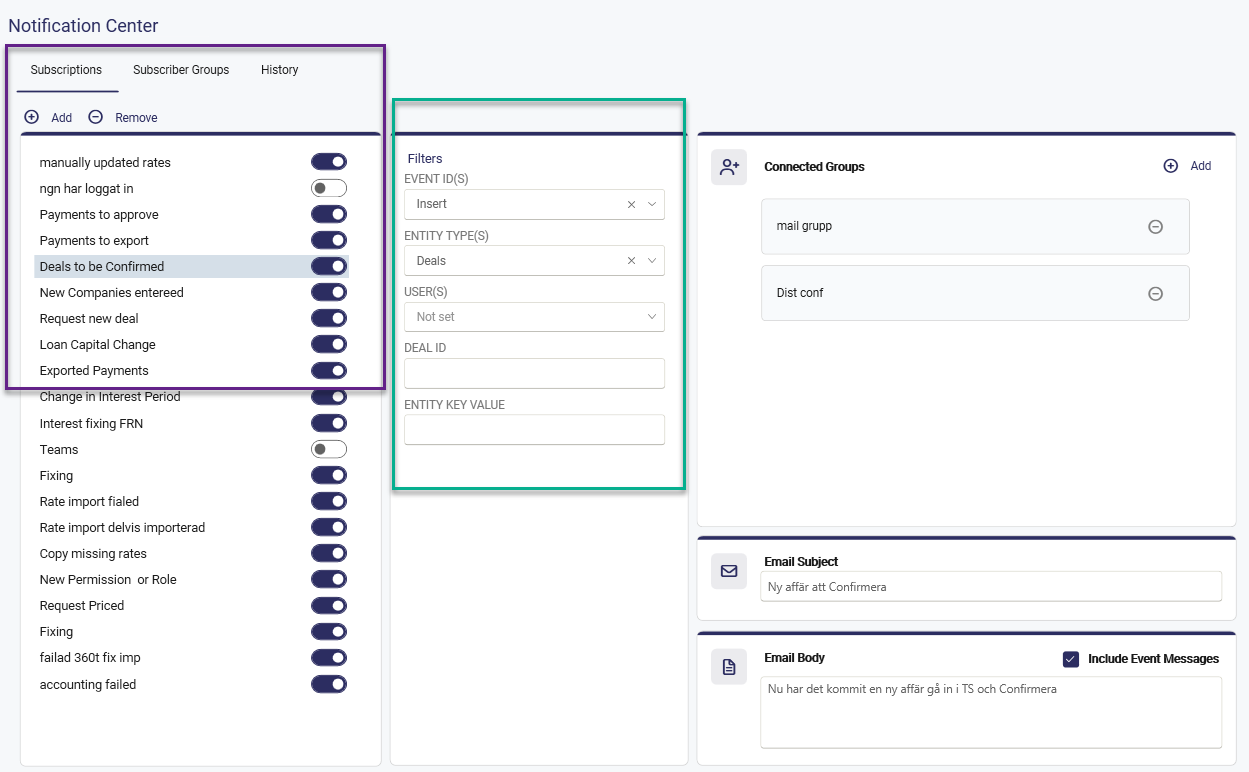
If a notification should be created when an activity in the autopilot fails, select the event id(s) in this example accounting Export failed
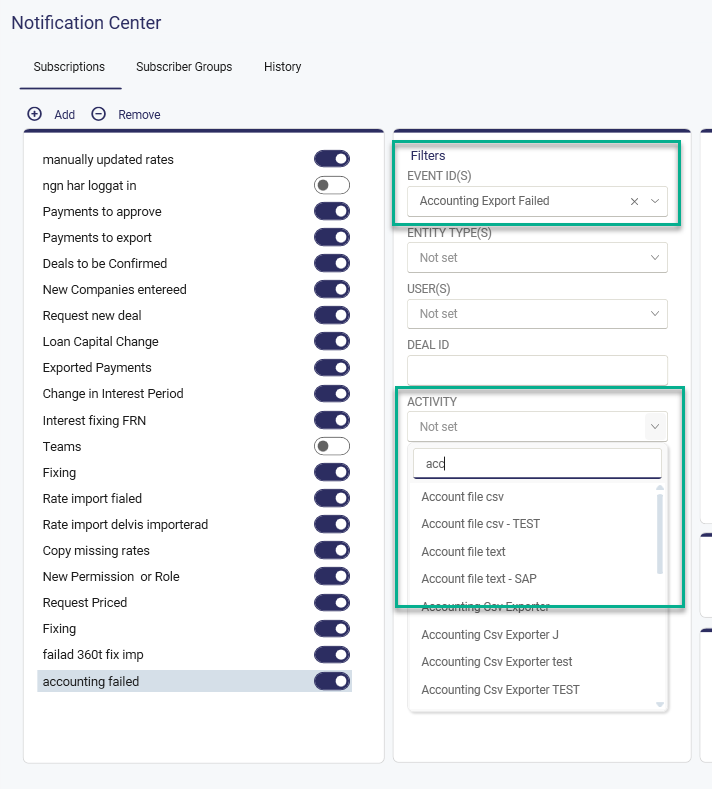
In the activity a drop down will be shown for all the activities in the Autopilot, select the current one and then select the subscriber group that should be notified.
Step 3: Configure Subscriber Groups
Next, connect one or more subscriber groups to the subscription.
A subscriber group defines who receives notifications or what actions are triggered.
If no subscriber groups exist, you must create them before continuing.
Multiple subscriber groups can be selected and combined within the same subscription.
Types of Subscriber Groups
1. Email Notifications
Use email groups to send alerts to specific recipients.
Configuration:
- Provide a group name
- Add one or more email addresses
- Define the email subject and email body
- Choose whether to include event details in the message, such as:
- Event message
- User
- Deal ID (if applicable)
Example email content:
Updated Payments (Id = 55802) Status changed from Approved to Exported by Maria App (DealId: 15505)
When the configured event occurs, an email alert is sent to all group members.
2. Action (Webhooks)
Action groups are used to notify external systems via webhooks.
Configuration:
- Provide a group name
- Paste the webhook URI
- Predefined options include Slack, Microsoft Teams, or other webhook-enabled platforms
When the event occurs, a notification is sent as a webhook payload to the configured endpoint.
⚠️ Webhook setup often requires support from your internal IT department.
Any system that supports incoming webhooks can be integrated.
3. Activity Triggers
Activity Trigger groups initiate automated processes when an event occurs.
Configuration:
- Provide a group name
- Select the activity to be triggered
Example activities:
- Start an autopilot process
- Generate and distribute a report
- Trigger other automated workflows
When the filtered event occurs, the selected activity is executed automatically.
Summary
With the Notification Center, you can:
- Monitor key events in Treasury Systems
- Notify users via email
- Integrate external collaboration tools through webhooks
- Trigger automated activities based on event-driven logic
This ensures timely communication, improved transparency, and automated follow-up actions across your treasury processes.
The Notification centre gives you more options to set up email Alerts, Activity triggers, and Webhooks ( e.g. Slack, Teams or others) for different events in Treasury Systems. Everything we log in TS event log, it is also possible to trigger an email alert, activity or webhoc.
Was this article helpful?
That’s Great!
Thank you for your feedback
Sorry! We couldn't be helpful
Thank you for your feedback
Feedback sent
We appreciate your effort and will try to fix the article