To analyse the profit and loss and changes of the profit and loss for a selected measuring period it is possible to breakdown the result into different components.
Each effect represented in individual report columns.
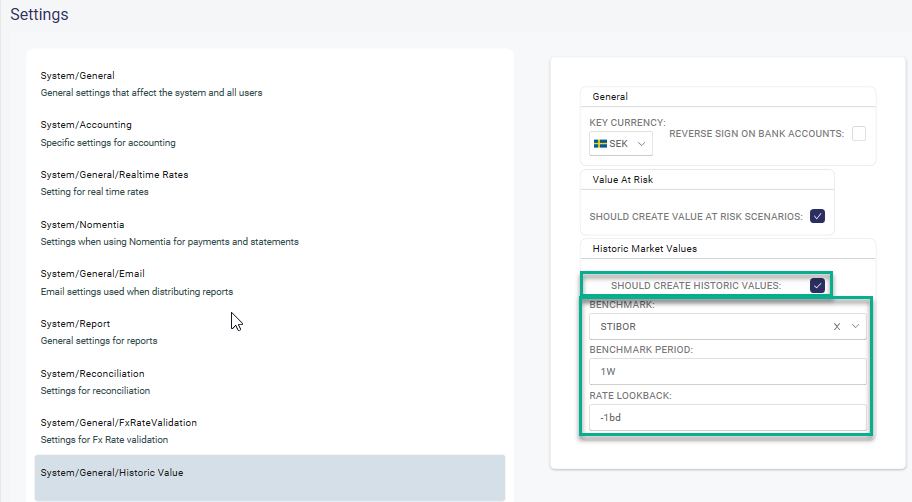
System Setting Activate "Should create Historic Values" Select consolidation currency (Key Currency). It is also possible to enter a Benchmark rate that the Profit&Loss of the actual portfolio can be compared with.
Note! If Rate Look Back is set to -1BD the benchmark return for today is calculated based on yesterdays Market Value times benchmark rate for yesterday. If Rate Look Back is blank the benchmark return for today is calculated based on yesterdays Market Value times benchmark rate for today.
Risk Portfolio Rules - are used to categories different deals into various risk portfolios. It is needed if the P&L should be calculated at the risk portfolio level.
Autopilot
There is an activity in the Autopilot to calculate the Historical Market values, Total Profit&Loss and the Profit&Loss components.Scenarios. This is scheduled to run after market date is imported and off business hours.
From Date - Normally -2 bd
To Date - Normally -1 bd
Normal selection is also available.
Historical Market Values
A view to look at the market values, total profit/loss and the profit/loss components. Possible to drill down all the way to a specific deal for a selected time period.
Can be used to dig deeper into the Profit/Loss numbers presented in the report. Please see more via the following link.
Report
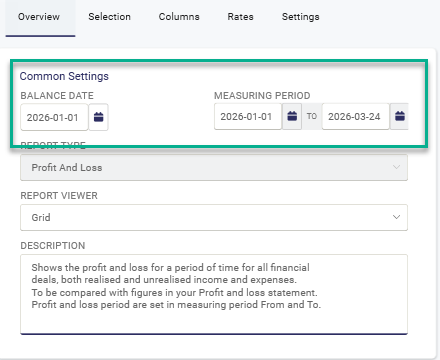
Define for which measuring period you want to see the profit/loss for.
The following columns are available in a report:
(All values are consolidated to selected Key Currency in System settings)
Total profit/loss
The difference between Market value Dirty from one date to another.
The sum of the 5 effects below.
FX effect
Effect of changes in FX rates from one date to another.
Accrual effect
Period interest amount allocated for selected measuring period
Rate effect
Effect of changes in the interest rate curves from one date to another. Market valuation on balance date with yield curves from balance date and the selected measuring period from date.
Roll effect
The effect of a shorter time to maturity, shifting the points on the curve used for calculating the market values.
In other words discounting the market value to a later day and see the effect when time has passed but nothing else.
Trade effect
The profit/loss for a new deal on it´s trade date (Deal Date).
Shape effect
The residual that is not explained by the four other effects.
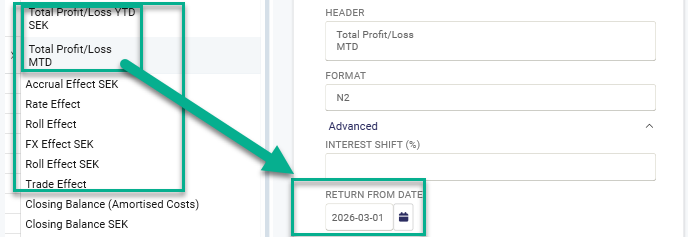
All the columns described above have the property 'Return from Date'. This gives the opportunity to see the Profit/Loss for several periods in one single report.
Example:
Defined Measuring period:

Column 'Total Profit/Loss YTD - 'Return From Date' blank - shows the result for selected Measuring period
Column 'Total Profit/Loss MTD - 'Return From Date' = 2026-03-01 - shows the result for 2026-03-01 - 2026-03-24
Was this article helpful?
That’s Great!
Thank you for your feedback
Sorry! We couldn't be helpful
Thank you for your feedback
Feedback sent
We appreciate your effort and will try to fix the article